
5.5 / 10
Mediocre
DFG SCORE
Average, has some problems & recommended with caution.
Pros
- 3D and 2D views.
- Multiplayer on the same computer or on a network.
- Hints are helpful for beginners just learning to play.
- Different chess board styles so you can pick which one you like.
Cons
- 3D view can make it tough to see your pieces.
- Game is prone to crashing.
- No difficulty settings.
Visit Grandmaster Chess to download, or for more descriptions, screenshots, videos, user ratings and more.
Grandmaster Chess Review

Review by Mick
Grandmaster Chess provides an excellent in-depth chess experience. This particular chess game is geared more towards medium level chess players. A lack of difficulty settings may be too challenging for beginners and too easy for experts. The 3D pieces and board combined with the option of a 2D view make this a good game to play if you already have some chess experience and want to improve your skills.
Hints and Appearance Customizations
This game is played with the normal rules of chess. Hints and tips can also be turned on if you need assistance. There are hints as to which move you should make, where any particular piece can move and what pieces are in danger of being captured. You can also adjust the appearance of the chess board and pieces. There are traditional style and pieces that have been glamored up a bit.
Advertisement
Only 1 Difficulty Setting Limits Options
With only one difficulty setting this game will probably be too difficult for absolute beginners. If you are willing to put in the effort and lose a large number of games it would be possible to learn enough from this game that you could compete with the computer opponent. The other option is to play the multiplayer with a friend. You can either compete on the same computer just taking turns, or you can compete over a network connection on separate computers.
Good Graphics
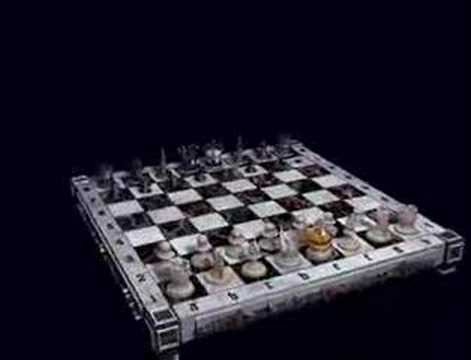
The graphics in this chess game are excellent. The 3D game board looks real and lets you feel like you really have a chess board in front of you. The sound also contributes to this. Each time you move a piece it sounds like you just set it down on the board. While the sound and graphics aren't top of the line they are definitely above average for the chess genre.
3D Chess View Doesn't Work Well
As you can see the game has a few flaws. The orientation of the camera for the 3D board can make it difficult to see the pieces in play. The smaller pieces can be blocked by larger pieces behind them and it is also very difficult to grab them. To see the location of the pieces you can switch to a 2D board view, you will most likely spend most of your time in the 2D view. This is nice to see the pieces but it would also be nice to be able to rotate the camera.
Advertisement
Prone to Crashing
Another drawback to this game is that it is prone to crashing. Periodically during multiplayer the game will encounter errors and be shut down. This also happens occasionally during solo play.
Conclusion - Pick Another Chess Game
Grandmaster Chess brings all the strategic elements of chess to your computer. A lack of difficulty levels severely limits this chess game. The only real audience this game would be suited for is a mid level chess player. A few options exist to help you learn, but they are minimal. Several other chess games on the market are a much better choice over this game.
Visit Grandmaster Chess to download, or for more descriptions, screenshots, videos, user ratings and more.
Gameplay Video
Player created video showing a 3D view of the game board.
Screenshots
Click Screenshot to enlarge


Social Media
Advertisement